FAQ
What's the default relation when creating Types and Elements ?
What's the default relation when creating Types and Elements ?
The default relation used by CoreModels when creating a Type along with its elements is the 'Domain Includes' relation which is the equivalent of (has-a) or the 'Composition' concept in programming languages
When should I use 'Domain Includes'/'Composition' and when to use 'SubClass Of'/'Inheritance' ?
Use SubClassOf when it’s an “is-a” relationship
- You’re saying one thing is a specialized type of another.
- All properties of the parent apply to the child.
Examples:
CarsubClassOfVehicle(every Car is a Vehicle).ScientificPostsubClassOfBlogPost.
Use this when the type is just a more specific version of another.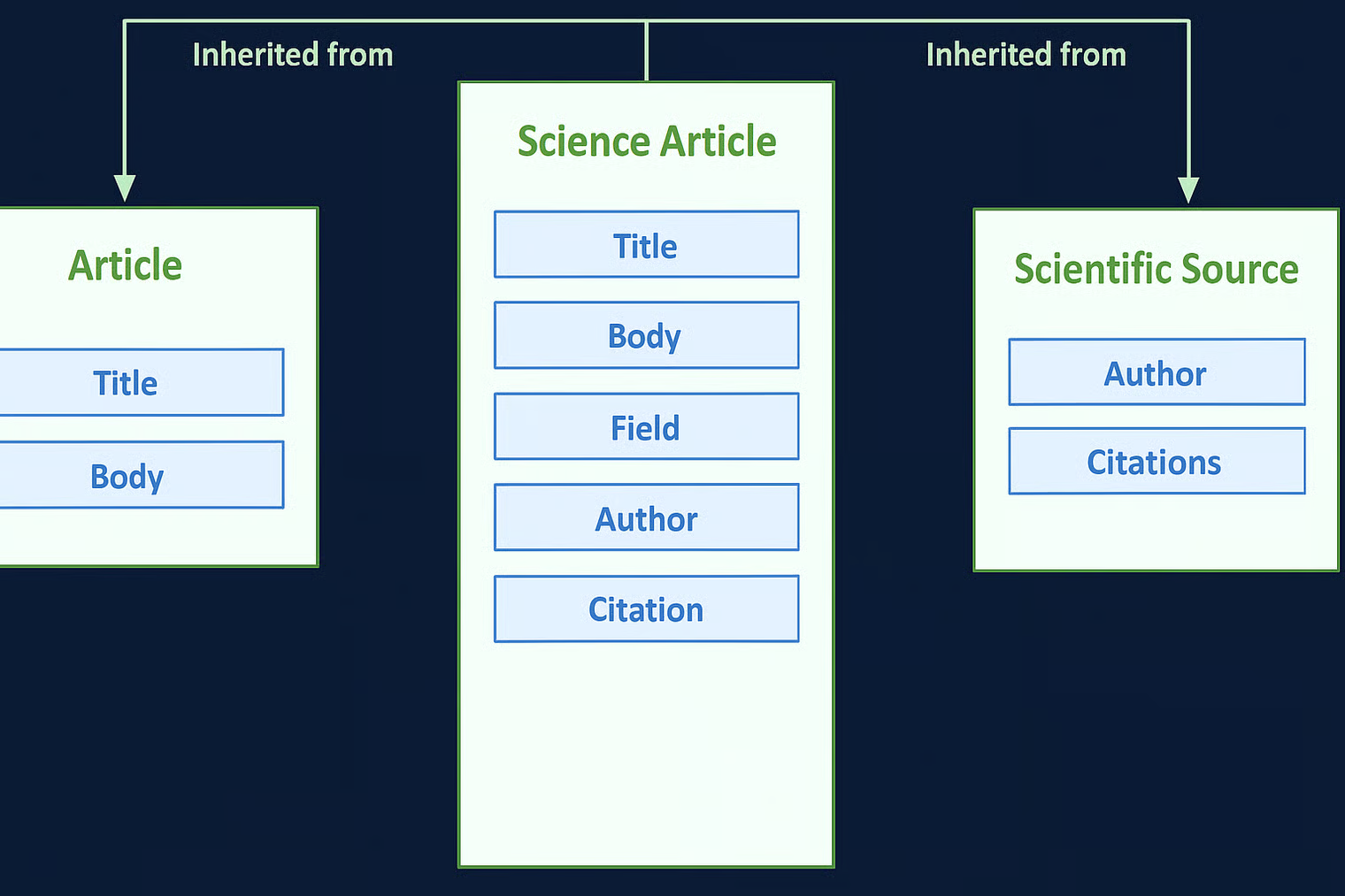
Use DomainIncludes when it’s a “has-a” relationship (composition)
- You’re saying: this property belongs to this class.
- It defines where a property can appear.
Examples:
TransmissiondomainIncludesCar.
→ “Cars have transmissions.”AuthordomainIncludesArticle.
→ “Articles have authors.”
Use this when you’re attaching properties (features, attributes, parts) to a class.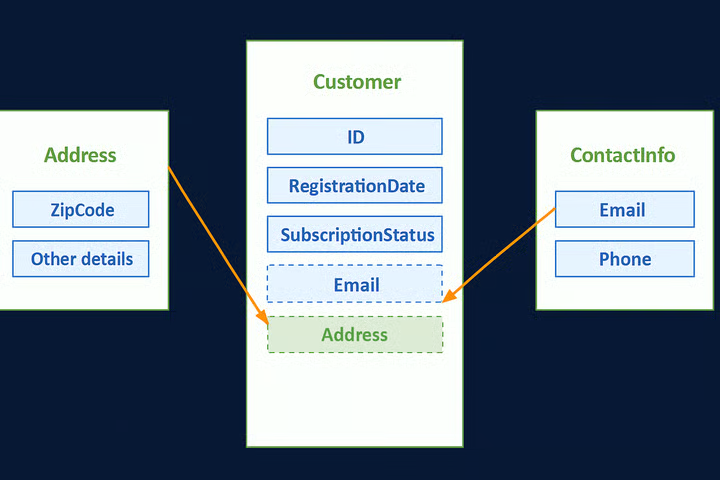
What is the difference between a Project and a Space?
A Project is the highest-level container in CoreModels. It holds one or more Spaces and defines the overall team and permissions. A Space is the technical term for a single schema and contains all the Types and Elements that make up that schema. Think of a Project as a portfolio and a Space as a single, organized project file within it.
Schemas, Spaces, and Data Models, what is the difference ?
Schemas, Spaces, and Data Models are three interconnected concepts that describe the structure of your data at different levels of a project.
Data Model
A Data Model is the abstract blueprint or framework that defines how all your data is organized. It's the highest-level concept, outlining the entities, their properties, and their relationships. A single Data Model can represent your entire business's data ecosystem. Think of it as a complete architectural plan for a building.
Schema
A Schema is the technical implementation of a Data Model. It's the specific, formalized set of rules that governs the structure of your data. While a Data Model is the abstract plan, a Schema is the code that defines it, such as a JSON Schema file or a set of SQL table definitions. A single Data Model can have different Schemas depending on the system or format used.
Space
A Space is the technical term in CoreModels for a single Schema. It acts as a project-level container that holds all the Types, Elements, and other assets that belong to a single, defined schema. A single project can have multiple Spaces, with each Space representing a distinct schema.
How can I add rules and constraints to my schema ?
You can add rules and constraints to your Elements using Mixins. A Mixin is a small piece of metadata that defines a specific behavior or rule. For example, you can add a required Mixin to an Element to make it mandatory, or a minLength Mixin to enforce a minimum number of characters.
How do I collaborate with my team ?
CoreModels is built for collaboration. First, you need to invite others to your project, open the 'share' menu that is available on the top right, then type your team member's email and select their role.
When clicking the 'Add User' button they will receive an email if they doesn't have an account already.
To collaborate with your team or even only to add notes, you can right click on any cell in CoreModels grids and click on 'Add Comment', which will start a thread linked to this cell.
Can I add My own relations ?
Yes you can add any relation to CoreModels by following these steps:
- Open the 'Features Tray' (by clicking the hamburger menu (☰) under the CoreModels logo)
- Click on 'Relations' → Plus button
- Add a name for the relation, and specify the 'from' and 'to' parts
- Click 'Add'
Now you can configure the grids to show the relation and use it.
Need more help?
If you have any questions that are not answered in our documentation, please contact us at tech@schematica.io or use the 'Report an Issue' feature directly in the UI.
This page is also available as Markdown for agents. The full index is at /llms.txt.